Archives for the month of: January, 2013

As a way to review the Pythagorean Theorem, I show a clip from the Simpsons in which Homer erroneously recites the Pythagorean Theorem. (Unfortunately Twentieth Century Fox decided that my 22-second clip was a copyright violation, regardless of its educational value.)

(Homer Simpson – The Pythagorean Theorem)

Then I display his words for the class to see and ask for corrections.

simpsons_0510_homer_pythagorus

[After putting on Henry Kissinger’s glasses, found in a men’s room toilet]

Homer: The sum of the square roots of any two sides of an isosceles triangle is equal to the square root of the remaining side.

Man in stall: That’s a right triangle, you idiot!

Homer: D’oh!

After we correct Homer’s version I ask if Homer’s version rings a bell with anyone. Eventually, perhaps after a hint or two, someone remembers the scene from the wizard of Oz.

(scarecrow doesn’t get a brain after all)

The Kaleidocycle is a three-dimensional paper device.

kaleidocycle 00a

The instructions at this website are very good.

http://sci-toys.com/scitoys/scitoys/mathematics/paper_ring.html

Comments on instructions:

1. I use a heavier paper like card stock or a manila file folder.

2. In order to get nice clean folds with the heavier paper, it is necessary to trace over the fold lines a few times with a ruler and ball point pen. The ball point pen thins out the paper and it will fold easily along the line. Fold along each line both ways a few times.

3. Using both hands, squeeze the paper like you are rolling it into a tube.

4. The pictures show which surfaces to glue together. I use rubber bands to hold things in place while the glue dries. Impatient students can use clear tape.

5. Bring the ends around so that they can be glued together. There are two ways to bend the ends around and you will be able to tell which way makes it easier to glue or tape. I insert both tabs, but glue the tabs one at a time. I hold things in place until the glue sets.

Here are some images of my construction:

0_kaleidocycle

This is the pattern I used:

caleidocyclus_6

Click to access caleidocyclus_6.pdf


0_hexaflexagons2

The flexagon is an entertaining paper toy that has some educational value.

1. What kind of triangles?
equilateral

2. Why the name trihexaflexagon?
Shaped like a hexagon. Has three “sides”. Two are visible and one is hidden.

3. During the operation of the flexagon, at one point you make 3 (congruent) 120-degree angles.

4. Some of the most interesting patterns to draw on the flexagon are symmetrical, but you can use any picture.

The pattern and instructions I’ve attached worked well with students. Before operating the flexagon, it helps to fold it in all directions along the diagonals.

Some students will need help the first time they fold and open the flexagon. If it does not want to open, flatten it and fold it along different lines. Students have a 50/50 chance of getting the first fold correct.

After doing the fold/open/flatten operation, rotate the flexagon one triangle and then you are ready for the next fold/open/flatten operation.

For the first few times, it helps to go back over the folds after flattening. The more the flexagon is used, the more it cooperates.

There are many websites, but this is a good one for starters.

http://www.flexagon.net/

This Hexahexaflexagon Tour video shows how to operate a flexagon.

Template:

0_flex_template

Instructions:

0_flexagon

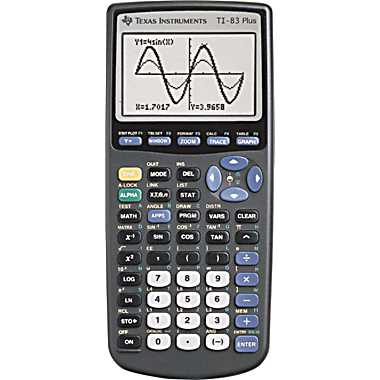
The Virtual TI83 is a calculator that runs on Windows computers. It is a great tool for instructing students in the use of the calculator because students can follow the mouse pointer as the buttons are pressed.

ti83

Download the following file.

https://www.dropbox.com/s/av08smbobtvsr43/vti83_jc_full.zip

Extract vti83_jc_full.zip into a new directory. The new directory will contain these three files.

83PBE_v112.rom
ti83plus.skn
vti83.exe

Execute the last one, vti83.exe. It will behave like a real TI83 and you will have to turn it back on if it turns itself off. To turn it off, right click the calculator and select exit.

The right-click menu contains a number of options including:

Emulation options – change the size of the calculator on the screen
Exit and save state – saves what is currently in memory
Exit without saving state – does not save what is currently in memory

When “Exit and save state” is selected, a file named 83PBE_v112.sav is created. If you want to start from a clean slate, instead of clearing the calculator memory, delete this file.

A manual for the TI83 can be found at http://education.ti.com/guidebooks/graphing/83p/83m$book-eng.pdf.

Flatland: A Romance of Many Dimensions
Edwin Abbott

Flatland_cover

Flatland is a fictional story about a two-dimensional geometrical world, its social structure, and the examination of worlds with more dimensions. The reader understands the one-, two-, and three-dimensional worlds and is asked to consider a four-dimensional world.

The book can be found on many websites including Project Gutenberg (www.gutenberg.org).

The 2007 35-minute movie with the voice of Martin Sheen stays pretty close to the story line of the book. The movie trailer can be viewed at http://www.youtube.com/watch?v=C8oiwnNlyE4. The official movie site is http://www.flatlandthemovie.com. The education edition (very expensive) DVD comes with worksheets. I have the home edition DVD and have not seen these worksheets, but googling “flatland worksheet” will locate worksheets created by others.

At one time there was another video version of the book on YouTube that was in 8 parts and had Portuguese subtitles, but it appears to be gone.

I used the book in my 9th grade math classroom as a way to introduce non-traditional math books. We read a short segment each week and discussed each segment after reading it. Because it was written in 1884 by an Englishman, the language is difficult for some students. If I had it to do over, I would use the book in high school honors math classes. I have seen the book used at the college level. The 2007 movie, however, is suitable for younger students with a basic understanding of geometry.

http://en.wikipedia.org/wiki/Flatland

geodome_small2

A geodesic dome is easily constructed from newspapers, tape, and staples with the aid of dowel rods for rolling the newspapers. My students used 3/8 inch dowel rods.

Newspapers are smaller these days, so I scaled down the two lengths from 71cm and 66cm to 60cm and 56cm lengths. It is important to cut equal amounts off the end of each tube so that both ends are sturdy.

In order not to be rushed, I used two class periods to construct a geodome. During the first class period we split up in groups to make the tubes. Some groups made the long tubes and some the short tubes. Some students did the rolling while others did the measuring and cutting. During the second class period we built the geodome. At any given time it takes a few students to hold the tubes in place while others staple the ends together. Students can take turns doing those tasks. The geodome will not stand on its own until the last connections are made.

The attached PDF provides detailed directions and some background information.

There are many versions of the instructions on the internet (google “geodesic clubhouse”) including this one:

http://britton.disted.camosun.bc.ca/clubhouse/Geodesic_ClubHouse_Printer_Version.htm
0_geodesic_club_house

Design a site like this with WordPress.com
Get started